
Helpful Answers Before Purchasing Your Video Management System

Video Management Software (VMS) and Network Video Recorders (NVR) are used to manage IP security cameras, view live videos, record events, search stored video, and respond to security incidents. Advanced systems also provide AI analytics, alerts, maps, and integration with other security technologies
Some camera manufacturers provide their own video management solutions, while others allow you to choose from a variety of VMS and NVR options. With so many choices available, how do you determine which system is best for your application?
The following questions and answers will help you understand the differences, evaluate important features, and select a surveillance management solution that meets your security requirements and budget.
Q1: How do I determine what’s the best solution?
A: First make a list of what you want to accomplish. There are several things to consider:
- Do you want an on-site software solution that runs in your own computers, or would you like a cloud-based solution that doesn’t require on-site maintenance?
- Do you want to integrate with other security equipment such as Door Access Control Systems or audio systems?
- Do you have a small number of cameras (16 or less), or do you have hundreds of cameras?
- Do you want a surveillance system that just records the video, or one that utilizes AI to detect immediate threats that need to be addressed quickly.
Q2: What is the difference between a VMS and an NVR?
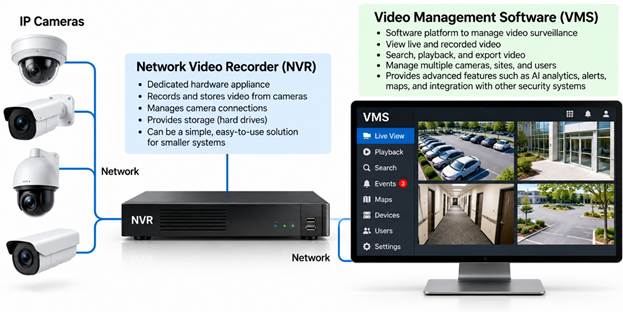
A2: A Network Video Recorder (NVR) is typically a dedicated appliance that records and manages camera video. A VMS is the software platform that manages video surveillance and may run on an NVR, server, virtual machine, or cloud infrastructure.
An NVR can be appropriate for smaller installations, while a scalable VMS may offer greater flexibility for larger or multi-location systems. To learn more, see Video Recording Systems.
Q3: What is the difference between on-premises, cloud, and hybrid VMS?
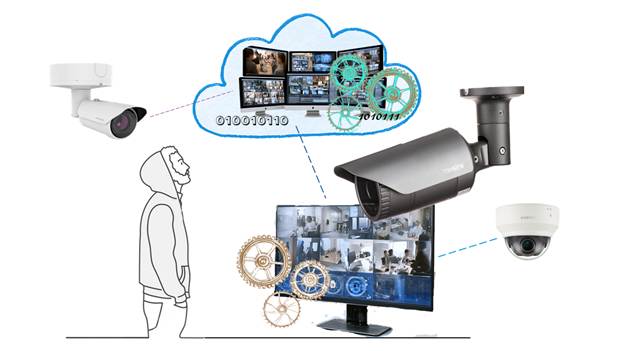
A3: There are on-premises and cloud type systems to consider:
| Type | Advantages | Considerations |
| On-premises VMS | Local control, flexible recording, reduced dependence on Internet connectivity | Requires local servers, storage, and maintenance |
| Cloud VMS | Centralized remote management, simpler software updates, reduced local infrastructure | Recurring fees and possible bandwidth limitations |
| Hybrid VMS | Combines local recording with cloud-based access and management | More architectural choices and potential complexity |
To learn more about the bandwidth requirements and management of Cloud Surveillance systems, take a look at the article, Cloud IP Camera Surveillance Systems.
Q4: How many cameras can a VMS support?

A3: Some systems are designed for a handful of cameras, while enterprise platforms can manage thousands across multiple locations.
Check licensing limits, server capacity, bandwidth, storage, and the ability to expand without replacing the entire system. The more cameras that are on the network, the more important network bandwidth capability is considered.
Q5: Can the VMS manage cameras from different manufacturers?
A5: Many open-platform systems can. This is especially important when upgrading an existing installation or combining cameras from multiple manufacturers.
If the VMS supports the ONVIF standard, it can support cameras that comply with that standard. If your cameras are older, it’s best to check with the manufacturer before purchasing. Verify support for the particular features you need, not just basic video recording. To learn more about different Video Management Systems read our article, Video Management Software.
Q6: How much video storage do I need?
A6: Storage depends on camera count, resolution, frame rate, compression, recording schedule, and retention requirements.
For example, a camera averaging 2 Mbps while recording continuously generates approximately 21.6 GB of video per day, before additional overhead.
A 30-day retention period would require approximately 648 GB per camera at that average bitrate.
Q7: How easy is it to find recorded video?
This is one of the most important VMS selection criteria.
Look for timeline searches, event filters, bookmarks, camera synchronization, and AI-assisted searches.
A good system should help security personnel find a specific event in minutes rather than spending hours reviewing recordings. Hanwha cameras includes attributes that assist in a search using WAVE VMS.
Q: What’s new with VMS software?
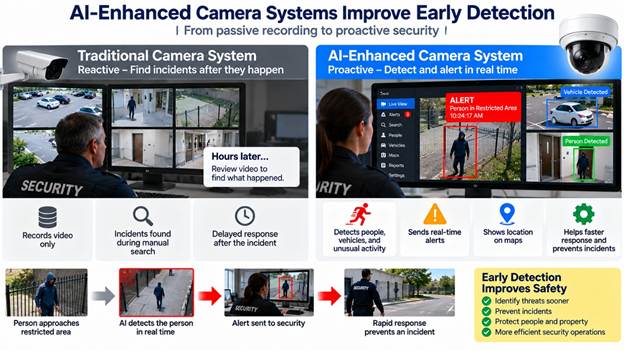
The most important advance in Video Management Systems is the AI-enhanced capability. AI detection and alert systems notify security as soon as a threat is detected. This capability turns video surveillance from a passive recording tool into an active security system. To learn more, see AI-enhanced Camera Systems.
Summary of Questions about Video Management Systems
Choosing the right Video Management Software is about more than recording and storing video. The best solution depends on the number of cameras, your storage requirements, ease of use, integration with other security systems, and the level of protection you need.
Today’s advanced VMS solutions do much more than help you review what happened yesterday. With AI-powered analytics, automated alerts, and integration with access control and other security technologies, they can help you detect threats as they occur and respond before a minor incident becomes a major problem.
The key is to select Video Management Software and the IP camera system that meets your current requirements while providing the flexibility to grow as your security needs change.
If you need help determining the best surveillance camera system for your organization, please get in touch with us at 914-944-3425, email dennis@kintronics.com, or use our contact form.